Can You Cluster Two Mini PCs to Run Bigger Local LLMs? (2026 Reality Check)
AMD published a four-node Framework Desktop cluster running a trillion-parameter model, and two DGX Sparks pool 256GB over a single cable. Here's when a second box actually helps, when it makes things slower, and which mini PC to buy if clustering is on your roadmap.
DataHardware Team
Our Top Pick
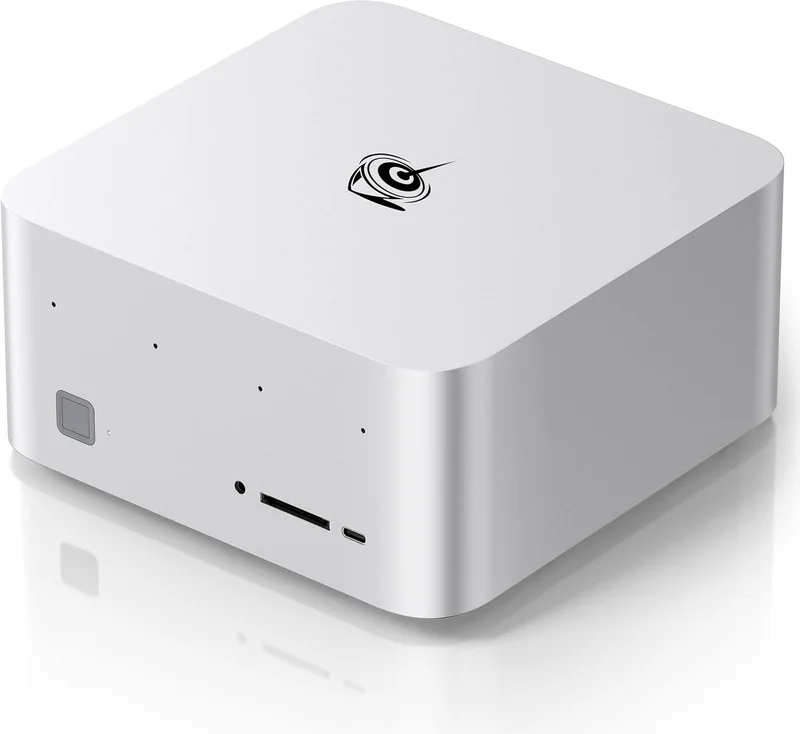
Beelink GTR9 Pro (Ryzen AI Max+ 395, 128GB)
$4,349Quick answer: Yes, you can — and the tooling is real. llama.cpp's RPC backend splits one model across multiple machines, AMD published a four-node Framework Desktop cluster (512GB pooled) running the trillion-parameter Kimi-K2.5, and two DGX Sparks pool 256GB over a single ConnectX-7 200GbE cable with no switch. But it only pays off for mixture-of-experts models above roughly 100GB. Two linked 128GB Strix Halo boxes have been measured by Starry Hope at about 10–15 tokens/sec on Qwen3-235B-A22B (Q3_K_S, ~101GB), against a projected 3–5 tok/s for a dense model of similar footprint — Starry Hope's estimate of what one would do, not a run they performed. The rule that decides it for almost everyone: if your target model fits in one box, a second box makes it slower, not faster — clustering adds memory capacity, never memory bandwidth.

What clustering actually does — and what it doesn't
Almost every disappointment in this topic traces back to one wrong assumption: that two machines are twice as fast as one. They are not. Understanding why takes one paragraph, and it will save you several thousand dollars.
The dominant approach in this category is layer splitting. You take a model's stack of transformer layers, put the first half on node A and the second half on node B, and pass the activations between them over the network as each token flows through. That is what llama.cpp's RPC backend does: each node runs an rpc-server holding its slice of the weights, and a coordinating process stitches them into one model. This is different from tensor parallelism, where a single layer's matrix multiply is split across devices — that pattern wants NVLink-class interconnect and is not what home clusters are doing.
Now the consequence. Token generation is gated by memory bandwidth — the machine re-reads model weights out of memory for every token it writes, a mechanism we unpack fully in unified memory vs VRAM for local AI. When you split a model across two nodes, each node still reads its own slice at its own bandwidth: roughly 215 GB/s real on a Ryzen AI Max+ 395 box, 273 GB/s on NVIDIA's GB10. You did not create a 430 GB/s machine. You created two 215 GB/s machines that take turns, with a network hop between them.
So the ledger is blunt:
- What you gain: memory capacity. Two 128GB boxes hold a model that needs more than 128GB. That is the entire benefit, and for the right model it is a benefit nothing else on a home budget provides.
- What you lose: latency at every layer boundary that crosses the wire, plus a second machine's idle power draw, plus a meaningful amount of setup and maintenance work.
- What you do not get: more bandwidth, faster tokens on a model that already fit, or a shortcut around the prefill problem.
"A cluster is a capacity instrument, not a speed instrument. If you can already load the model, adding a node is a downgrade you paid for."

The interconnect decides everything — and it's the spec you didn't check
Here is the part that turns this from a curiosity into a purchasing decision. When you bought your 128GB box, you compared memory, bandwidth, price, and maybe noise. Almost nobody compares the NIC. If clustering is anywhere on your roadmap, the NIC is the spec that decides whether the box can participate at all.
There are four tiers available in this category, and the catalog splits cleanly along them:
| Interconnect | Boxes that ship it | What's documented |
|---|---|---|
| USB4 / Thunderbolt direct-attach | Most Strix Halo boxes (2× USB4 40Gbps); MS-S1 Max has USB4 v2 at 80Gbps | Measured at roughly 9.4 Gbps effective between two Strix Halo hosts in the kyuz0 amd-strix-halo-toolboxes backend testing — far below the port's nominal rating |
| 2.5GbE | GMKtec EVO-X2, HP Z2 Mini G1a | The entry-level constraint. Workable, but it is the narrowest pipe in the category |
| Dual 10GbE | Beelink GTR9 Pro (Intel E610), Minisforum MS-S1 Max | The only two Strix Halo SKUs we track with 10GbE. Direct-attach between two nodes needs no switch |
| ConnectX-7 200GbE | NVIDIA DGX Spark, ASUS Ascent GX10 | Purpose-built for two-unit clustering, plus a 10GbE RJ-45 for everything else |
Now the nuance the rest of the internet is missing, and it cuts against the expensive option. At these model sizes, latency matters more than raw bandwidth. The activations passed between layer boundaries are small; what hurts is the round-trip cost of passing them, repeated at every boundary, for every token. The kyuz0 testing includes a result on a 50 Gbps Ethernet link between Strix Halo hosts where bandwidth was not the limiting factor — meaning the link had headroom the workload could not use.
The honest conclusion follows directly: do not assume 200GbE delivers proportionally faster inference than 10GbE. No published source supports a 20× claim, and the 50 Gbps result argues against it. What ConnectX-7 buys you is headroom and simplicity — a link you will never have to think about, on a platform where two-unit clustering is a supported, documented feature rather than a community project. That is worth real money to some buyers. It is not a measured speedup, and anyone selling it to you as one is guessing.
The practical read for most people: 10GbE is the sweet spot, USB4 direct-attach is a workable fallback with a real measured ceiling, and 2.5GbE is the tier you should avoid buying into if a second node is even a maybe.

What people have actually built: three documented clusters
Attribution first, because it is load-bearing: DataHardware has not benchmarked a cluster. Every number in the table below belongs to the source named in its row. We have aggregated them because nobody else has put them side by side — not because we reproduced them.
| Build | Hardware / pooled memory | Interconnect | Model | Reported throughput | Source |
|---|---|---|---|---|---|
| AMD's four-node reference | 4× Framework Desktop, 128GB each — 512GB pooled | 5 Gbps Ethernet | Kimi-K2.5, UD_Q2_K_XL, ~375GB | Not stated as a headline figure in the guide | AMD Developer Resources, "How to Run a One Trillion-Parameter LLM Locally: An AMD Ryzen AI Max+ Cluster Guide" (2026). ROCm + llama.cpp RPC, Ubuntu 24.04.3 LTS |
| Two-node Strix Halo pair | 2× Sapphire Edge AI Max+ 395 — 256GB pooled, ~$5,400 total at April 2026 prices | Ethernet (Linux-first setup) | Qwen3-235B-A22B, Q3_K_S, ~101GB | ~10–15 tok/s (MoE, measured) vs 3–5 tok/s (dense of similar size — projected, never run) | Starry Hope, "Linked Strix Halo Mini PCs for 235B LLM Inference" (2026-04-01) |
| Two-unit DGX Spark cluster | 2× DGX Spark — 256GB pooled | ConnectX-7 200GbE direct-attach, no switch | 405B-class | Setup documented; llama.cpp pinned to a specific commit | freshlab.es, "Two DGX Spark Units as a Local LLM Cluster: Full Setup Guide", plus the jareklupinski/dgx-spark-2x-cluster and RustRunner/DGX-Llama-Cluster repositories |
Three things jump out of that table.
First, the anchor is vendor-published. AMD itself wrote the four-node guide — that is not a hobbyist claiming something works, it is the silicon vendor documenting the procedure with an exact OS version and toolchain. Framework Desktop being the hardware in that build is not a coincidence either: at $3,449 it is still the cheapest credible 128GB box we track, which makes it about as cheap per node as this gets — the EVO-X2 vs Framework Desktop comparison covers what you give up for that price.
Second, the AMD build ran on 5 Gbps Ethernet. Read that again next to the 200GbE row. A trillion-parameter model, four nodes, and a link slower than the 10GbE on a GTR9 Pro. That single data point is the strongest evidence that the interconnect arms race is oversold at these model sizes.
Third, independent homelab work backs the pattern. Jeff Geerling has published testing of four clustered Framework Mainboards running large LLMs — a widely trusted, vendor-independent source arriving at the same node count.
What the table deliberately does not contain: a throughput number for two Beelink GTR9 Pros over 10GbE. Nobody has published one, and we are not going to derive one from the Sapphire result. If you build that configuration you will be ahead of the documentation.
MoE is the whole reason this works
This is the technical heart of the post, and it is the one section worth reading even if you never build a cluster.
A mixture-of-experts model does not use all of its parameters for every token. It routes each token to a small subset of specialist sub-networks. Kimi-K2.5 — the model in AMD's reference build — carries roughly 1.03 trillion total parameters but activates only about 32 billion per token, selecting 8 of 384 experts, per Moonshot AI's model card. A dense model of the same size would activate all 1.03 trillion, every token.
Hold that against the bandwidth mechanism from the first section and the whole thing clicks. Generation speed is set by how many bytes you must read per token. A cluster running Kimi-K2.5 must hold a trillion parameters — which is why you need 512GB and why one box cannot do it — but only moves about 32B worth per token. The capacity requirement is enormous; the per-token bandwidth requirement is modest.
That asymmetry is exactly what makes a slow interconnect survivable. Less weight traffic per token means fewer and smaller transfers across the wire, so the network penalty lands on a smaller base. A dense model gets no such relief: every token drags the full weight set through memory on both nodes, and the network cost is paid on top of an already bandwidth-saturated workload.
Starry Hope puts a number on the difference, and it is not subtle: ~10–15 tok/s measured for Qwen3-235B-A22B (MoE) against 3–5 tok/s projected for a dense model of comparable footprint on the same two-node hardware. Be precise about which is which — the MoE figure is a run, the dense figure is Starry Hope's estimate of a model they never loaded. Taken at face value that is roughly a 3× gap from architecture alone, but only one side of it has been measured.
"MoE is what makes home clustering viable at all. The cluster's job is to hold parameters; MoE's job is to make sure you only move a fraction of them per token. Take MoE away and you are paying for two machines to run a model badly."
So the buying rule writes itself: check your target model's architecture before you check anything else. If it is dense, stop reading and go size a single box against our guide to the best local LLM models for a 128GB mini PC. If it is MoE and above ~100GB at your target quantization, keep going. DeepSeek R1 671B is the other obvious candidate in this shape — a 671B-total MoE that no single box in our catalog loads at Q4.
The cost math: two boxes vs one bigger box
This is the section that actually decides the purchase. The two-box totals below are plain arithmetic on our catalog price seeds — those seeds are dated and this category re-prices weekly, especially after the 2026 DRAM spike documented in why local-AI mini PC prices jumped in 2026. Verify at checkout.
| Configuration | Pooled memory | Catalog price (×2 where noted) | Interconnect |
|---|---|---|---|
| 2× Beelink GTR9 Pro | 256GB | ~$8,698 ($4,349 each) | Dual 10GbE |
| 2× Framework Desktop | 256GB | ~$6,898 ($3,449 each) | USB4 |
| 2× Minisforum MS-S1 Max | 256GB | ~$7,598 ($3,799 each) | Dual 10GbE + dual USB4 v2 |
| 2× ASUS Ascent GX10 | 256GB | ~$11,998 – $15,998 ($5,999–$7,999 each) | ConnectX-7 200GbE |
| 2× NVIDIA DGX Spark | 256GB | ~$9,398+ ($4,699+ each) | ConnectX-7 200GbE |
| 1× Mac Studio M4 Max | Up to 128GB | $2,499+ (final price, discontinued) | n/a — single box |
| 1× Mac Studio M3 Ultra | 96GB only, then discontinued | $5,299 (final price) | n/a — single box |
Two observations that reframe the whole comparison.
The cheap cluster is no longer cheap. The floor is now two Framework Desktops at ~$6,898, or two MS-S1 Maxes at ~$7,598, for 256GB of pooled memory — roughly double the spring 2026 figure, because the DRAM spike repriced every node in this table. A single Mac Studio M3 Ultra closed out at $5,299 with just 96GB — Apple pulled the 256GB and 512GB configurations during the DRAM shortage, then discontinued the machine outright. That withdrawal is still the reason clustering is on the table at all. The one-box answer to "I need more than 128GB" used to be a 256GB or 512GB M3 Ultra. That answer does not exist at retail, and a cluster is what filled the vacuum — it is just a far more expensive way to fill it than it was in the spring.
The expensive cluster stopped being an outlier. Two DGX Sparks is $9,398+ for the same 256GB — about 1.4× a Framework Desktop pair, and only ~$700 above two GTR9 Pros. The Strix Halo boxes absorbed the DRAM spike harder than the GB10 boxes did, so the CUDA premium is much narrower than it was earlier in 2026. Per the interconnect section you still should not expect proportional inference gains for the 200GbE; you are buying CUDA, DGX OS, and a supported two-unit clustering path. Whether that is worth $2,500 depends entirely on whether your workflow needs CUDA, which is the question our DGX Spark vs Strix Halo comparison exists to answer.
And the line item people forget: power. A second box doubles your idle draw, permanently, for a machine that only earns its keep when you are running an oversized model. We worked the annual electricity number for a single always-on box in local AI mini PC power consumption and running cost — double it, and add that to every total in the table above before you decide.

If you might ever cluster, buy this box
The single most useful thing in this article, if you have not bought yet: buy the 10GbE box the first time. The memory in every one of these machines is soldered, so there is no upgrade path — and there is no NIC upgrade path either on a sealed mini PC. The networking you buy on day one is the networking you have forever.
The quiet cluster node: Beelink GTR9 Pro
At $4,349 the GTR9 Pro is the most expensive consumer Strix Halo box we track — only the business-channel HP Z2 Mini G1a ($5,349+) sits above it — and the DRAM spike hit it hardest, and it no longer undercuts anything, including the Framework Desktop. What it still brings is dual 10GbE (Intel E610) plus dual USB4, and vapor-chamber cooling that holds sustained ~120W inference quietly. Acoustics matter more in a cluster than in a single box because both nodes are pinned for the whole run. Buy it for the noise floor, not the price — the GTR9 Pro vs MS-S1 Max comparison works through the rest.
The caveat you must price in, because it is directly load-bearing here: the GTR9 Pro has reported 10GbE NIC instability under heavy GPU load, driver-dependent. In normal use that is an annoyance. In a cluster it is the exact failure mode that breaks your workload — heavy GPU load and heavy NIC traffic are simultaneous, by definition, during distributed inference. Test the link under sustained load before you commit, and read our full GTR9 Pro review for the rest of the picture.
The value cluster node: Minisforum MS-S1 Max
At $3,799 the MS-S1 Max now lands $550 below the GTR9 Pro per node — the ranking here inverted during the 2026 repricing — and for a cluster specifically it was already the better machine: dual 10GbE, dual USB4 v2 at 80Gbps, a PCIe x16 slot, a 320W internal PSU, and a 2U rack-mount option. The rack option is not a vanity spec once you own two or three of these. The 320W PSU and oversized cooler mean the best sustained inference before throttling in the group — again, a cluster runs both nodes hot for the whole job.
The CUDA and clean-scaling pick: DGX Spark or ASUS Ascent GX10
Buy the DGX Spark ($4,699+) or the ASUS Ascent GX10 ($5,999–$7,999) if you need CUDA-native tooling or you want two-unit clustering as a documented product feature rather than a project. ConnectX-7 200GbE direct-attach is the only interconnect in the catalog that is not a compromise, and both boxes run 128GB at 273 GB/s with DGX OS. The GX10 used to be the cheap way in; the DRAM spike reversed that, and as of September 2026 it prices above the DGX Spark at every SSD tier. What it offers now is stock availability and larger NVMe options on the same GB10 platform — see DGX Spark vs Ascent GX10.
Excellent boxes, wrong buy for a cluster
Said plainly, because it is the useful version: the GMKtec EVO-X2 and the HP Z2 Mini G1a are both very good single machines — the EVO-X2 is a quiet, expandable always-on inference appliance and the Z2 Mini is the business-grade pick with vPro, ECC, and a 3-year warranty. Both ship 2.5GbE only. If clustering is on your roadmap they are the wrong purchase, and no amount of everything-else-being-good changes that. If clustering is not on your roadmap, ignore this paragraph entirely.

Setting it up: what you're signing up for
This is not a step-by-step tutorial — it is the friction inventory you should read before deciding, because the honest version of this decision includes the work.
- Linux, first-class. AMD's reference build runs Ubuntu 24.04.3 LTS. The Starry Hope two-node build is explicitly Linux-first. ROCm-based RPC on Windows is underdeveloped, and if your plan involves clustering under Windows, revise the plan.
- ROCm on the AMD side. You are in the ROCm/Vulkan/llama.cpp world, not CUDA. It has improved enormously, and it is still the rougher path the moment you step outside plain inference.
- A llama.cpp build with RPC support, on every node. Then an
rpc-serverprocess on each node holding its shard, with the coordinating process pointed at all of them. - Version pinning across nodes. One published DGX cluster guide pins llama.cpp to a specific commit. That is not fussiness — it is a signal of how fast this tooling moves. Mismatched builds across nodes are the most common way a cluster fails to come up.
- Model sharding decisions. How the layers divide across nodes is a tuning parameter, not a default that is right for every model and node count.
- Per-node VRAM allocation still applies. Each Strix Halo node independently needs its GPU memory allocation raised toward the ~96GB ceiling — the same BIOS-and-driver procedure as a single box, now performed twice and kept in sync. Our Strix Halo VRAM allocation guide covers the actual steps.
None of this is exotic if you are comfortable on the Linux command line. All of it is a weekend if you are not, and a recurring maintenance obligation either way, because you now version-control a toolchain across two machines instead of one.

Who should not cluster
Most of you. Here is the short list, and if you match any line on it, a second box is a mistake.
- Your model fits in 128GB → don't. Splitting a model that already fits makes it slower. This alone disqualifies the majority of people who ask the question. Size honestly against what a single 128GB box actually runs first.
- Your model is dense → don't. Starry Hope projects 3–5 tok/s for a dense model this size — a projection, not a run, and not an interactive experience either way. No interconnect fixes it; the bottleneck is architectural.
- You need fast prefill on long contexts → don't. Prefill is compute-bound and already the weakest axis of this hardware; adding network hops to it is the wrong direction. Our prefill and time-to-first-token deep dive explains why this is the metric that quietly ruins long-context workflows.
- You want one machine that just works → don't. Buy a Mac Studio M4 Max. Up to 128GB at 410–546 GB/s, silent, and the lowest-friction software stack in local AI — the trade-offs are laid out in Mac Studio M4 Max vs Strix Halo, and the rest of the lineup sits on our Apple silicon hub.
- You are chasing tokens per second → don't. Clustering is orthogonal to speed. If throughput is the goal, spend the second box's budget on bandwidth instead; our Strix Halo tokens-per-second data is the single-node baseline to measure any cluster claim against.
The population left after that filter is small and specific: people who need a mixture-of-experts model larger than about 100GB, who are comfortable in Linux, and who value capacity over latency. For them, a cluster is the only affordable way to do what they want. For everyone else, the correct upgrade is a better single box.
Bottom line
- Clustering works, and the tooling is real. llama.cpp RPC, a vendor-published four-node AMD guide on Framework Desktops running a 1.03T-parameter MoE, and a documented two-unit DGX Spark cluster over a single 200GbE cable.
- It buys capacity, never bandwidth. Each node still reads at ~215–273 GB/s. Two boxes are not a faster box; they are a bigger one.
- MoE or nothing. ~10–15 tok/s measured on Qwen3-235B-A22B versus a projected 3–5 tok/s dense on the same two-node hardware (Starry Hope). Architecture decides this before hardware does — though only the MoE half of that comparison has actually been run.
- Buy the NIC you will need. Minisforum MS-S1 Max ($3,799) is now both the cheaper and the better-connected node; Beelink GTR9 Pro ($4,349) buys a quieter sustained load. 2.5GbE boxes are excellent single machines and the wrong cluster nodes.
- Don't buy 200GbE expecting a speedup. AMD ran a trillion-parameter model over 5 Gbps Ethernet. ConnectX-7 is headroom and a supported path, not a measured multiplier.
- Two boxes = two idle draws, two toolchains, two BIOS allocations. Price the maintenance, not just the hardware.
The reason this topic is worth taking seriously in 2026 — and was not in 2024 — is a supply accident. The one-box answer to "I need more than 128GB" was a 256GB or 512GB Mac Studio M3 Ultra, and the DRAM shortage removed it from the shelf. Two $3,449 boxes and a cable is what replaced it. That is a genuinely good deal for the narrow set of people running large mixture-of-experts models locally, and a genuinely bad one for everybody else, and the difference between those two groups is a single question you can answer before you spend anything: does my model fit in one box?