Unified Memory vs VRAM for Local AI: Why Capacity Now Beats Bandwidth (2026)
VRAM is fast but capped at ~32GB; unified memory trades bandwidth for 128GB+ of capacity. Here's the exact trade-off, why Mixture-of-Experts models flipped the math, and which box to buy for the model you actually run.
DataHardware Team
Our Top Pick
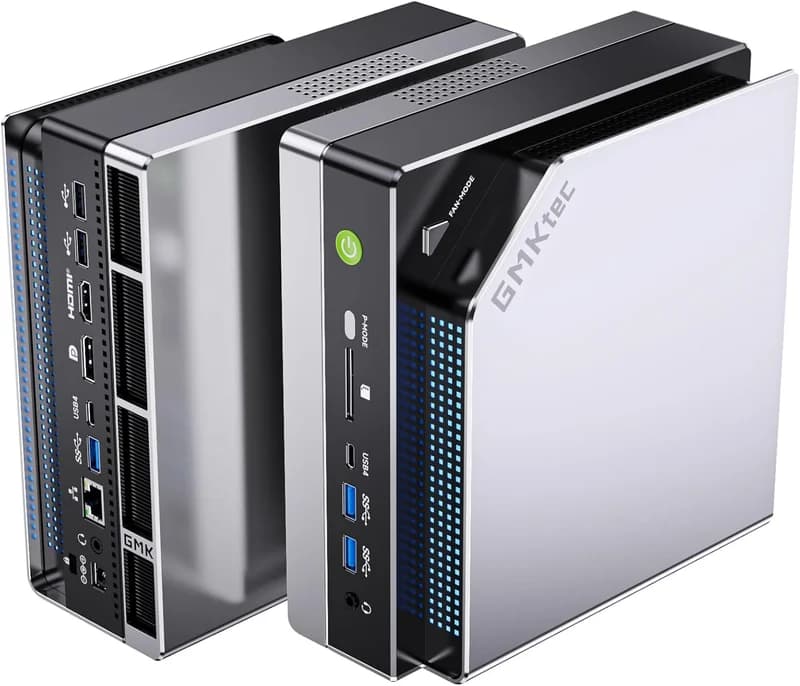
GMKtec EVO-X2 (Ryzen AI Max+ 395, 128GB)
$3,649Quick answer: Unified memory and discrete VRAM answer two different questions for local AI. VRAM — the GDDR6X/GDDR7 soldered to a discrete GPU — is very fast (~800–1,000+ GB/s) but capped hard on capacity (an RTX 5090 has just 32GB). Unified memory is one coherent pool the CPU and GPU share, so it scales far higher on capacity (128GB on Strix Halo and NVIDIA GB10 boxes, up to 512GB on Apple's M3 Ultra at launch) but runs at lower bandwidth (~120–819 GB/s). Capacity decides whether a model fits; bandwidth decides how fast it runs. And because Mixture-of-Experts (MoE) models need capacity to hold all their weights but only a fraction of the bandwidth per token, unified memory is now the better buy for the biggest models you can actually run at home — while a discrete GPU still wins for anything that fits in ~32GB.
What "unified memory" actually means
Start by killing the biggest misconception. When people hear "shared memory" they think of the bad old integrated graphics of a decade ago — an iGPU begging for a slice of slow system RAM, unable to run anything serious. Modern unified memory is a different animal.
In a conventional PC, memory is split in two: the CPU has its own DDR5 system RAM, and a discrete GPU has its own VRAM (GDDR6X or GDDR7) on the card. To run a model on the GPU, the weights have to be copied across the PCIe bus into VRAM, and if the model is bigger than the VRAM, it simply won't load. Two pools, a slow bridge between them, and a hard ceiling set by the smaller pool.
Unified memory collapses that into one pool. The CPU and GPU sit on the same package and address the same physical memory coherently — no copy, no PCIe bottleneck, no duplicated data. On AMD's Ryzen AI Max+ 395 ("Strix Halo") you get 128GB of LPDDR5X-8000, of which up to 96GB is assignable to the GPU as VRAM (and on Linux the GTT path pushes it higher still — see our VRAM allocation guide). Apple's chips expose the entire pool. NVIDIA's GB10 "Grace Blackwell" superchip does the same with 128GB of coherent memory shared between its Arm CPU and Blackwell GPU.
The result is that a ~$3,500 mini PC can hold a 70B model that no consumer graphics card can touch. That is the whole reason this architecture matters — and it's why the question stopped being "how much VRAM" and became "how much memory, and how fast."
The two numbers that decide everything: capacity vs bandwidth
Every local-AI hardware decision comes down to two memory numbers, and confusing them is the most expensive mistake buyers make.
Capacity decides whether a model runs at all. A model's weights have to fit in the memory the GPU can address, or it won't load (or it spills to disk and slows to a crawl). Here's the 4-bit quantization rule of thumb you can size a box against:
| Model size (4-bit) | Approx. memory for weights | Practical box |
|---|---|---|
| 7B | ~6GB | Runs on almost anything (16GB+) |
| 13B | ~10GB | 16–32GB |
| 30B | ~24GB | 48–64GB |
| 70B | ~42GB + context | 96GB+ allocatable |
| GPT-OSS 120B (MoE) | ~60–65GB | 128GB box |
Add context on top of the weights — a long context window can add several GB more. This is the axis where unified memory wins outright: an RTX 5090's 32GB stops at roughly a 30B model, while a 128GB box sails past 70B into 120B MoE territory.
Bandwidth decides how fast it runs. Once a model fits, token-generation speed is capped by how fast the hardware can stream weights out of memory — memory bandwidth, not raw compute. Here's where the two architectures invert, with a clear ladder from system RAM up to discrete GPUs:
| Platform | Memory bandwidth | Capacity |
|---|---|---|
| System DDR5 RAM (CPU-only inference) | ~50–100 GB/s | up to 128GB+ |
| Apple M4 (base Mac Mini) | 120 GB/s | 16–24GB |
| Strix Halo (Ryzen AI Max+ 395) | 256 GB/s theoretical (~215 GB/s real) | 128GB |
| NVIDIA GB10 (DGX Spark / ASUS GX10) | 273 GB/s | 128GB |
| Apple M4 Pro | 273 GB/s | up to 64GB |
| Apple M4 Max | 410–546 GB/s | up to 128GB |
| Apple M3 Ultra | 819 GB/s | 96GB (256/512GB discontinued in 2026) |
| Discrete GPU (RTX-class GDDR) | 800–1,000+ GB/s | 8–32GB |
Read those two tables together and the trade-off is stark. Discrete VRAM lives at the top of the bandwidth ladder and the bottom of the capacity ladder. Unified memory does the opposite — except for Apple's M3 Ultra, which is the rare box that climbs both. For a deeper breakdown of what these bandwidth numbers translate to in real tokens/sec, see our Strix Halo tokens-per-second deep dive.
Why "read every weight per token" makes bandwidth the ceiling
Here is the one mechanism that explains all of the above — and it's the sentence worth remembering. To generate each new token, the hardware has to read the model weights it needs for that token out of memory. Not compute them from scratch — read them. So, on a napkin:
generation speed ≈ memory bandwidth ÷ bytes read per token
This is why token generation is called memory-bound: you cannot buy your way out of it with more compute, because the GPU spends most of each token waiting on memory, not calculating. A discrete GPU with 1,000 GB/s of bandwidth reads a dense 40GB (4-bit 70B) model's weights ~25 times per second; a Strix Halo box at ~215 GB/s reads them ~5 times per second. Same model, ~5× the speed, entirely down to bandwidth. Compute barely enters the equation for single-stream inference.
"For local AI in 2026, unified memory and discrete VRAM answer two different questions: VRAM (800–1,000+ GB/s but capped at ~32GB) decides how fast a model that fits will run, while unified memory (128–512GB at ~120–819 GB/s) decides whether a large model fits at all — and because Mixture-of-Experts models need capacity for all their weights but bandwidth for only the few active per token, unified memory is now the better buy for the biggest models you can actually run at home."
That memory-bound reality is exactly why, for years, "you need VRAM for AI" was good advice: the models that mattered were dense, and dense models punish low bandwidth. Then the models changed.
The plot twist: Mixture-of-Experts changed the math
This is the early-curve insight that makes unified memory the winning bet in 2026, and most spec-sheet advice hasn't caught up to it. XDA Developers ran the same argument as a headline on 2026-05-26: "High-VRAM GPUs aren't the future of local AI — unified memory and Mixture of Experts models are." Here's why.
A dense model activates every parameter for every token. A dense 70B reads all ~40GB of its 4-bit weights per token — worst case for a bandwidth-limited box. A Mixture-of-Experts model is built differently: it holds a large set of "expert" sub-networks resident in memory, but routes each token through only a few of them. It needs the capacity to keep all experts loaded, but the per-token memory traffic is tiny.
The numbers make the point. On a Strix Halo box:
| Model (4-bit) | Type | Active params/token | Strix Halo speed |
|---|---|---|---|
| Dense 70B (e.g. Llama 3.3 70B) | Dense | ~70B | ~5 tok/s |
| GPT-OSS 120B | MoE | ~5.1B | ~31 tok/s @ ~120W |
| Qwen3-30B-A3B | MoE | ~3B | 72–75 tok/s |
Look at that middle row: a 120-billion-parameter model runs 6× faster than a 70B dense model on the same box, because it only reads ~5B weights per token instead of ~70B. This is the whole game. A slow-bandwidth 128GB unified box should be terrible at big models — and it is, for dense ones — but MoE models need exactly what unified memory is good at (capacity) and little of what it's bad at (bandwidth). StorageReview ran GPT-OSS 120B on the HP Z2 Mini G1a with no discrete GPU at all; ServeTheHome measured ~31 tok/s at ~120W on the Beelink GTR9 Pro. Neither would be possible on a 32GB GPU, because the model doesn't fit.
The frontier open models of 2026 — GPT-OSS, Qwen3, DeepSeek, Mixtral descendants — are overwhelmingly MoE. That trend is what flips the buying math. We break the dense-vs-MoE speed gap down further in our tokens-per-second post, and walk through the 120B case end to end in how to run GPT-OSS 120B locally on a mini PC.
When VRAM still wins
Unified memory is not a free lunch, and pretending otherwise would cost you money. A discrete GPU is still the right call in three cases:
- Models that fit in ≤24–32GB. If your workload is 7B–30B dense models, a used RTX 3090 or 4090 (24GB) will out-generate any unified-memory box on tokens/sec, often for less money. Below the ~32GB line, buy bandwidth.
- Prompt-heavy / long-context work. Prefill — processing the input prompt before the first token — is compute-bound, not bandwidth-bound, and it's where unified-memory boxes are weakest. Feed a big RAG retrieval or a whole code file to a Strix Halo box and you'll wait noticeably longer for the first token than a dGPU would make you wait. Headline tok/s figures describe decode speed and hide this.
- CUDA-dependent training and tooling. Most fine-tuning scripts, many inference servers, and a lot of the ML ecosystem assume NVIDIA. On AMD Strix Halo you live in ROCm/Vulkan/llama.cpp land — improving fast but still rougher. Apple is MLX/llama.cpp only. If your work depends on the CUDA stack, that's a real constraint (and one reason to look at NVIDIA's GB10 boxes, which keep CUDA and add capacity).
Be honest with yourself about which regime you're in. The "unified memory is the future" framing is true for the biggest models — it is not a reason to abandon a GPU for models that fit comfortably in VRAM.
Which architecture — and which box — should you buy?
Here's the decision, mapped straight to hardware. Match the box to the largest model you'll actually run.
Small models & agents (7–13B) → budget iGPU boxes
If you'll never touch a 30B+ model, you don't need a big unified pool. A 32GB mini PC runs 7–13B dense models comfortably for a fraction of the price — we quote no tok/s figure for that tier because no published benchmark covers those exact boxes, only the faster Strix Halo silicon above. The DRAM shortage lifted this tier too — the Beelink SER8 sits at $799 as of October 2026, well above its old sub-$500 street price — but the 128GB boxes still cost 4–6× as much. The Beelink SER8 ($799 – $939, Ryzen 7 8845HS, 24–32GB), GMKtec M6 Ultra ($629, Zen 4, 32GB — head-to-head), and the entry-level MAGICNUC AS1 ($329, 16GB) are the value picks for always-on agents and light inference.
30B-class, silent → Mac Mini M4 Pro
For 30B models with zero fan noise and the macOS/MLX ecosystem, the Mac Mini M4 Pro ($1,599 final, discontinued, up to 64GB, 273 GB/s) was the value sweet spot — comfortable capacity for 30B-class models and enough bandwidth to keep them interactive (step up: M4 Pro vs Mac Studio M4 Max). The base Mac Mini M4 ($799 final, discontinued) was the cheapest way into unified memory, but its 24GB / 120 GB/s ceiling caps it at 7–14B (Mac Mini M4 vs Beelink SER8).
70B / 120B MoE on a budget → Strix Halo
This is the category that redefined local AI. A 128GB Ryzen AI Max+ 395 box holds 70B-class and large MoE models no consumer GPU can fit. Pricing moved a long way in 2026 — the DRAM shortage pushed this whole tier from the ~$2,000 launch window into the $3,400–$4,400 range, so budget accordingly. The GMKtec EVO-X2 ($3,649) is the flagship all-rounder; the Framework Desktop ($3,449) is the cheapest credible 128GB box and the best tinkerer/Linux story; the Beelink GTR9 Pro ($4,349) adds dual 10GbE for NAS/cluster work (EVO-X2 vs GTR9 Pro), and the Minisforum MS-S1 Max ($3,879) carries the heaviest IO of the group — dual 10GbE, dual USB4 v2 and a PCIe x16 slot (GTR9 Pro vs MS-S1 Max). Head-to-head: EVO-X2 vs Framework Desktop. All four share ~215–256 GB/s bandwidth and soldered memory — buy the 128GB SKU up front. More options in our Strix Halo hub. For the chip itself, read our Ryzen AI Max+ 395 explainer; for a hands-on take, the GMKtec EVO-X2 review.
Maximum bandwidth at capacity → Mac Studio M4 Max / M3 Ultra
If you want capacity and speed, Apple is the only unified-memory option that climbs both ladders. The Mac Studio M4 Max (up to 128GB at 410–546 GB/s; $2,499+ final, discontinued in September 2026 and replaced by an M5 Max Studio from $2,499) delivers higher real bandwidth than any Strix Halo or GB10 box, and the Mac Studio M3 Ultra is the outright bandwidth king at 819 GB/s — roughly 3× a Strix Halo box. One 2026 caveat: the M3 Ultra's 256GB and 512GB configs were discontinued during the DRAM shortage, so it shipped in 96GB only at the end, listing at $5,299 before Apple discontinued it in September 2026. You pay Apple pricing, and you get no CUDA — MLX/llama.cpp only. See the Apple Silicon hub, or M4 Max vs M3 Ultra side by side.
CUDA + clustering → NVIDIA DGX Spark / ASUS Ascent GX10
If you need CUDA-native tooling or plan to scale, NVIDIA's GB10 boxes keep the full CUDA stack and add 128GB of coherent unified memory. The DGX Spark ($6,950 for the 128GB model — up from $3,999 at launch, via $4,699 in February 2026, on memory supply; a 64GB GB10 configuration at $4,999 goes on sale through OEMs on October 23, 2026, though 64GB gives up the capacity edge that makes these boxes worth buying) and the more-available ASUS Ascent GX10 ($5,999–$7,999) run at 273 GB/s and carry a 200GbE ConnectX-7 NIC, so two boxes cluster into a 256GB pool for 405B-class models. The two are the same silicon in different chassis — see DGX Spark vs Ascent GX10. Full lineup in our GB10 / DGX Spark hub. You're buying CUDA and capacity, not bandwidth — at 273 GB/s the token throughput is only a hair ahead of Strix Halo and a third of the M3 Ultra's (M3 Ultra vs DGX Spark). See DGX Spark vs EVO-X2 spec by spec, and our DGX Spark vs Strix Halo head-to-head for the full breakdown of the two flagship unified boxes.
The 30-second decision table
| Your workload | Architecture | Buy |
|---|---|---|
| 7–13B models, always-on agents | Budget iGPU | Beelink SER8 / GMKtec M6 Ultra (~$630–$800) |
| 30B-class, silent, macOS | Unified (mid) | Mac Mini M4 Pro ($1,599 final, discontinued) |
| 70B / 120B MoE, best value | Unified (128GB) | GMKtec EVO-X2 / Framework Desktop (~$3,450–$3,650) |
| Max speed at 128GB | Unified (high-BW) | Mac Studio M4 Max (546 GB/s, discontinued) |
| CUDA + clustering to 405B | Unified + CUDA | NVIDIA DGX Spark / ASUS GX10 |
| Anything that fits in ≤32GB, max tok/s | Discrete VRAM | Used RTX 3090/4090 build |
Already know the architecture and just want the box by budget? Jump to our best mini PC for local LLMs buyer's guide.
Bottom line
Unified memory and VRAM aren't really competitors — they're answers to different questions. VRAM (~800–1,000+ GB/s, ~32GB cap) is how you race a small model; unified memory (128–512GB at ~120–819 GB/s) is how you fit a big one. For years bandwidth was the constraint and VRAM was the answer, because the models that mattered were dense. In 2026 the constraint moved to capacity and the models moved to Mixture-of-Experts — which need the memory unified pools have and little of the bandwidth they lack. Capacity-per-dollar is the story now: below ~32GB, buy VRAM for speed; above it, buy unified memory to run the model at all. Match the box to the model, not to the spec sheet.