Beelink GTR9 Pro Review (2026): The 128GB Strix Halo Box With Dual 10GbE — Real Local-LLM Benchmarks & Who Should Buy
The Beelink GTR9 Pro is a ~$4,349 128GB Ryzen AI Max+ 395 mini PC that runs GPT-OSS 120B at 31.41 tok/s (125–128W) but a dense 70B at only ~5 tok/s. Its real hook is dual 10GbE — plus a real caveat: reported 10GbE instability under heavy GPU load. Benchmarks, thermals, and how it stacks up against the EVO-X2, Framework Desktop, and DGX Spark.
DataHardware Team
Our Top Pick
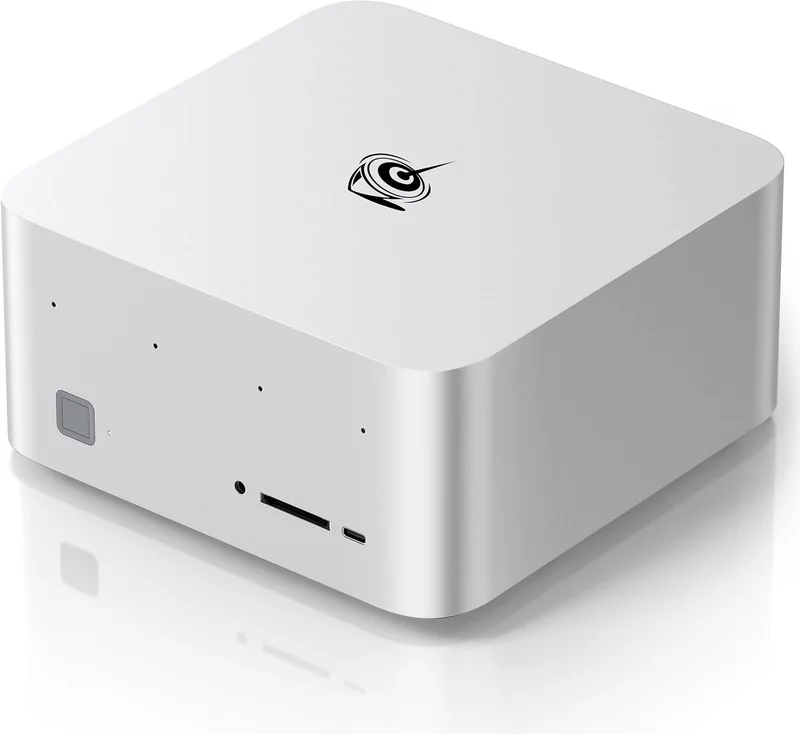
Beelink GTR9 Pro (Ryzen AI Max+ 395, 128GB)
$4,349Quick answer: The Beelink GTR9 Pro is the best-connected 128GB AMD Ryzen AI Max+ 395 ("Strix Halo") mini PC — same silicon as the GMKtec EVO-X2 and Framework Desktop, but with dual 10GbE and dual USB4 for roughly $4,349 after the DRAM-shortage repricing. On its 128GB of LPDDR5X-8000 unified memory (~256–273 GB/s), ServeTheHome measured GPT-OSS 120B at about 31.41 tok/s while drawing ~120W — but a dense 70B model like Llama 3.3 70B slows to around 5 tok/s on the same box, because MoE models activate only a fraction of their weights per token. A vapor-chamber cooler keeps that sustained inference quiet — ServeTheHome measured 125–128W and 39–41 dBA on gpt-oss 120B, against 36–37 dBA idle. The one thing to know before you buy: reported 10GbE NIC instability under heavy GPU load (driver-dependent). Buy it for the networking; if you don't need 10GbE, the EVO-X2 or Framework Desktop save you money.
What the GTR9 Pro actually is (and who it's for)
Every 128GB "Strix Halo" box on the market runs the identical AMD chip: the Ryzen AI Max+ 395, a single APU that fuses a 16-core Zen 5 CPU, a 40-CU Radeon 8060S iGPU, a 50-TOPS NPU, and 128GB of LPDDR5X-8000 unified memory — up to 96GB of which is assignable as VRAM. So when you shop the GTR9 Pro against the EVO-X2, Framework Desktop, Minisforum MS-S1 Max, and HP Z2 Mini, you are not choosing silicon. You're choosing I/O, cooling, chassis, and price.
Beelink's specific bet with the GTR9 Pro is connectivity. Here's the configuration, pulled straight from the spec sheet:
| Component | Beelink GTR9 Pro |
|---|---|
| APU | AMD Ryzen AI Max+ 395 (16C/32T, Zen 5) |
| GPU | Radeon 8060S (40 CU, RDNA 3.5) |
| NPU | 50 TOPS (XDNA 2) |
| Unified memory | 128GB LPDDR5X-8000 |
| Memory bandwidth | ~256–273 GB/s |
| Storage | 2TB NVMe, dual M.2 2280 (up to 16TB) |
| Networking | Dual 10GbE (Intel E610), Wi-Fi 7 |
| I/O | 2× USB4 (40Gbps), HDMI 2.1, DP 2.1 |
The dual 10GbE + dual USB4 is genuinely rare in a box this size, and it reframes who this machine is for. This is the Strix Halo box for home-lab and NAS operators — people who want to pull multi-gigabyte model files off a fast NAS at line speed, or wire two boxes together to distribute a workload. If that's not you, the same compute is available cheaper elsewhere. Beelink prices the GTR9 Pro at roughly $4,349 direct (verified October 2026; regular list $4,699) — and note the ordering has flipped since this review first ran: the GTR9 Pro now sits above the EVO-X2 ($3,649) and the Framework Desktop ($3,449) rather than undercutting them, so the 10GbE is a paid-for upgrade, not a freebie. The DRAM shortage has repriced this whole category upward through 2026, so verify the current price at the retailer before you buy. The memory is soldered; whatever SKU you pay for is the one you keep. The rest of the field is laid out in our Strix Halo mini PC hub.
Local-LLM performance: the token numbers that matter
This is the section you came for, and it's where most general mini-PC reviews cut a corner. They quote the flashy "120B at 31 tok/s" and move on. We're going to explain why a dense 70B on the same box crashes to about a sixth of that — because that distinction is the single most important thing to understand about every Strix Halo benchmark.
Speed on the GTR9 Pro is governed by memory bandwidth, not compute or capacity. Once a model fits in the 128GB pool, the thing that caps how fast it generates tokens is how quickly the box can stream the weights it needs for each token. Here's the picture:
| Model (4-bit unless noted) | Approx. memory | GTR9 Pro generation speed | Verdict |
|---|---|---|---|
| 7–8B dense | ~6GB | 42–53 tok/s | Effortless, snappy |
| 13B dense | ~10GB | Comfortable, interactive | Great daily driver |
| 30B dense | ~24GB | Mid-tier (double-digit → low) | Very usable |
| 70B dense (e.g. Llama 3.3 70B) | ~42–48GB | ~5 tok/s | Runs, but not interactive |
| GPT-OSS 120B (MoE, ~5.1B active) | ~60–65GB | 31.41 tok/s @ 125–128W | Interactive — the sweet spot |
Sources & caveats. The headline GPT-OSS 120B figure — 31.41 tok/s, at 125–128W and 39–41 dBA — is ServeTheHome's measurement on this exact box (the GTR9 Pro is the machine they benchmarked; the power and noise numbers are on page 4 of that review, the tok/s on page 3). The dense 70B ~5 tok/s figure is ServeTheHome's "around 5 tokens/second" on Llama 3.3 70B, matched by Shisa V2 70B at 5.0 on Level1Techs. The 7–8B dense 42–53 tok/s spread is measured across GPU backends by Level1Techs and llm-tracker.info — it replaces a "50–80 tok/s" band this page used to carry, which no published run supports. Every number is quant-, context-, and runtime-dependent, and prompt processing (prefill) on long contexts is slower than generation — the caveat most benchmarks gloss over. For a bandwidth-first breakdown of what these boxes actually produce, see our Strix Halo tokens-per-second guide.
Why 120B is fast and 70B is slow: MoE vs dense
(Background: sparse vs dense models.) As the DataHardware hardware desk puts it: "The GTR9 Pro runs GPT-OSS 120B at about 31 tokens per second while drawing roughly 120 watts — but a dense 70B like Llama 3.3 slows to around 5 tokens per second on the same 128GB box, because MoE models activate only a fraction of their weights per token." That one sentence reframes every Strix Halo number you'll ever read.
Here's the mechanism. For a dense 70B, generating each token requires streaming all ~70B parameters through the memory bus. At ~256 GB/s that's inherently slow — you get single-digit tok/s, and this is the source of the "local AI is slow" reputation. It's correct, for dense models.
A Mixture-of-Experts model like GPT-OSS 120B flips the math. All ~117B parameters sit resident in the 128GB pool, but only the active experts — about ~5.1B parameters — stream per token. So the per-token memory traffic is closer to a 5B model than a 70B one, and the same box that crawls on dense 70B produces interactive ~31 tok/s. You pay for 128GB of capacity to hold the model, but only the bandwidth cost of a small model per token. That's why the GTR9 Pro and modern MoE models are made for each other — and why, if you're buying this box, a big MoE is the smart 2026 workload, not a dense 70B. Our full walkthrough lives in how to run GPT-OSS 120B locally, where the GTR9 Pro is one of the recommended machines.
The dual-10GbE story — the whole reason to pick this box
Strip away the networking and the GTR9 Pro is just another 128GB Strix Halo box. The dual 10GbE (Intel E610) plus dual USB4 (40Gbps) is the differentiator, and for the right buyer it's decisive. Two concrete jobs it unlocks:
- Line-rate model loading from a NAS. A 4-bit 70B GGUF is 40–48GB; a full library of models is hundreds of gigabytes. Over 2.5GbE (what the EVO-X2 and Framework offer) you're capped at ~300 MB/s and a big model takes minutes to pull. Over 10GbE you're at ~1.1 GB/s — you can swap resident models off a fast NAS without it becoming the bottleneck.
- Two-box workflows. Dual 10GbE lets you directly link the GTR9 Pro to a second box (or a 10GbE switch) for distributed setups — pushing a dataset between machines, or serving inference from one while ingesting on another. It's not the 200GbE clustering of a DGX Spark, but for a home lab it's the practical rung.
Now the honest part that competitors bury or skip entirely. Multiple reviewers and early owners have reported the 10GbE NICs becoming unstable — dropped links or BSODs — under heavy sustained GPU load. The evidence points to a driver-dependent issue rather than a hardware defect: firmware and Intel E610 driver updates have improved it, and many users run stable, but it's a real, documented rough edge on a box whose entire selling point is networking. Phoronix's ongoing coverage of Linux/ROCm behavior on Ryzen AI Max+ 395 hardware is a good place to track driver maturity. Our take: if 10GbE reliability during inference is mission-critical for you, treat this as a known risk, check current driver status, and keep firmware updated. If you just want the 10GbE for occasional model transfers between inference runs, it's a non-issue in practice.
Thermals & noise: built for always-on inference
An inference appliance lives or dies on sustained-load behavior — it's not doing 30-second bursts, it's holding a model resident and answering queries for hours. The GTR9 Pro's vapor-chamber cooler with a dual-fan design shows up in ServeTheHome's numbers: running GPT-OSS 120B the box drew 125–128W at 39–41 dBA, against 16–25W at 36–37 dBA idle, measured in a 34 dBA room (power and noise page). Quiet enough to sit on a desk without becoming a nuisance, and cool enough not to need a rack.
What that means in practice: the GTR9 Pro is genuinely suited to 24/7 duty as a home-lab inference server. Leave GPT-OSS 120B loaded, hit it from your other machines over 10GbE all day, and it won't fight you on heat or noise. That sustained-load quietness is arguably as important as the token numbers for anyone building an always-on local-AI setup — and it's the pairing (10GbE + quiet sustained inference) that makes this box a coherent product rather than a spec-sheet grab-bag.
GTR9 Pro vs the alternatives
The GTR9 Pro competes with four boxes we actually carry. Three of them share its exact silicon, so — again — the decision is I/O, cooling, price, and software stack, not raw capability.
| Box | Price | Networking | The reason to pick it over the GTR9 Pro |
|---|---|---|---|
| Beelink GTR9 Pro | ~$4,349 | Dual 10GbE | The baseline: best-connected 128GB box; NAS/cluster networking |
| GMKtec EVO-X2 | ~$3,649 | 2.5GbE | Quieter, safer all-round appliance — and ~$700 cheaper if you don't need 10GbE |
| Framework Desktop | $3,449 | USB4 (direct-only) | Cheapest credible box; standard mini-ITX + open firmware = best tinkerer/Linux story |
| Minisforum MS-S1 Max | ~$3,879 | Dual 10GbE + PCIe x16 | Even more I/O — dual USB4 v2 (80Gbps), a PCIe x16 slot, 2U-rack option for clusters |
| NVIDIA DGX Spark | $6,950 | 200GbE + 10GbE | CUDA-native + 200GbE clustering to 405B |
vs GMKtec EVO-X2 — the sibling that skips 10GbE
The GMKtec EVO-X2 ($3,649) is the closest comparison and, for most buyers, the safer default. Identical APU, identical 128GB, identical token speed — but only 2.5GbE, and (crucially) none of the GTR9 Pro's 10GbE-instability question mark. It is also now roughly $700 cheaper, which sharpens the question: if networking isn't your reason for buying, the EVO-X2 is the quieter, more predictable, less expensive appliance. The GTR9 Pro only wins this matchup if you'll actually use the 10GbE. We break the EVO-X2 down fully in our GMKtec EVO-X2 review, and put the two head-to-head in EVO-X2 vs GTR9 Pro.
vs Framework Desktop — the cheapest, most open alternative
The Framework Desktop ($3,449) is the same silicon on a standard mini-ITX board with open firmware — the pick if you want to drop it in your own case, run Linux, and tinker. It's direct-only (no Amazon) and offers no 10GbE. Against the GTR9 Pro it's a clean split: Framework for the lowest price and the best DIY/Linux story, GTR9 Pro for finished-appliance networking. If you're a tinkerer who doesn't need 10GbE, Framework is the value play.
vs Minisforum MS-S1 Max — the step up for cluster builders
If you like where the GTR9 Pro is going with I/O but want more of it, the Minisforum MS-S1 Max ($3,879) is the enthusiast step-up: dual 10GbE plus dual USB4 v2 (80Gbps), a PCIe x16 slot, a 320W internal PSU, and a 2U-rack-mount option. The 2026 repricing has turned this into an awkward matchup for Beelink: at $3,879 the MS-S1 Max is currently ~$470 cheaper than the GTR9 Pro while offering strictly more I/O and cooling, and it is now easier to get: Minisforum's own store still quotes mid-October shipping, but Amazon listed it in stock at $3,879 on October 18, while Beelink's direct store still sells the GTR9 Pro as a pre-order with ~35-day shipping. For cluster builders the MS-S1 Max is the better buy; the GTR9 Pro's remaining argument is a smaller, quieter chassis. Side by side: GTR9 Pro vs MS-S1 Max.
vs NVIDIA DGX Spark — the CUDA question
If you're cross-shopping "should I just get NVIDIA instead," the NVIDIA DGX Spark ($6,950 for the 128GB model after NVIDIA's October 2026 price rise, up from $4,699 in February) is the CUDA-native answer. Its 273 GB/s bandwidth barely edges the GTR9 Pro's ~256–273 GB/s, so on single-box inference the two are close — the premium buys CUDA tooling and a 200GbE NIC that clusters two boxes into a 256GB pool for 405B-class models. That premium has widened again: after briefly shrinking to about $350, it is now roughly $2,600 at the 128GB tier. NVIDIA's new 64GB GB10 SKU ($4,999, OEM-only, on sale from October 23) is closer in price but halves the memory, so it can't hold the same models. Buy it if you need CUDA for fine-tuning/NVIDIA-only servers, or true 200GbE clustering. We walk the full decision in DGX Spark vs Strix Halo, and the wider CUDA-box field is in the GB10 / DGX Spark hub.
Who should buy the GTR9 Pro (and who shouldn't)
Buy the Beelink GTR9 Pro if:
- You need dual 10GbE — pulling models/datasets off a fast NAS at line speed, or wiring two boxes together — and accept paying ~$4,350 for it.
- You're building a quiet, always-on 128GB inference appliance and value the vapor-chamber cooling for sustained 24/7 duty.
- Your smart workload is a large MoE model (GPT-OSS 120B at ~31 tok/s), not a dense 70B.
- You're comfortable in the ROCm/Vulkan/llama.cpp/LM Studio world and don't need CUDA.
Don't buy the GTR9 Pro if:
- You don't need 10GbE → the GMKtec EVO-X2 or Framework Desktop give you the same compute for $700–$900 less without the 10GbE-instability question.
- 10GbE reliability during inference is mission-critical and you can't tolerate driver risk → verify current driver status first, or consider the Minisforum MS-S1 Max.
- You need CUDA or 200GbE clustering to 405B → the NVIDIA DGX Spark.
- You want the highest token throughput at 128GB → an Apple Mac Studio (up to 546–819 GB/s) has far more bandwidth (no CUDA, macOS/MLX; see the Apple Silicon hub). See the best mini PC for local LLMs in 2026.
- Your models are all 7–13B → a $400–$600 budget mini PC does that for a quarter of the money.
Bottom line
The Beelink GTR9 Pro runs GPT-OSS 120B at 31.41 tok/s (125–128W, 39–41 dBA) and a dense 70B at only ~5 tok/s on its 128GB of ~256–273 GB/s unified memory — the same capacity-not-speed story as every Strix Halo box, with the same MoE-over-dense lesson baked in. What sets it apart is dual 10GbE + dual USB4, which makes it the best-connected 128GB box for NAS-fed, always-on, home-lab inference at roughly $4,349 — and its vapor-chamber cooling keeps that load quiet enough for 24/7 duty. The catch you won't find foregrounded elsewhere: reported 10GbE instability under heavy GPU load, driver-dependent and improving, but real. Buy it for the networking. The 2026 DRAM repricing has also weakened its value case: it is no longer the cheap way into 128GB, and both the EVO-X2 and the more capable MS-S1 Max now undercut it. If you don't need 10GbE, the EVO-X2 or Framework Desktop are the smarter spend — and whichever you choose, verify the current street price, because the DRAM shortage has this whole category moving.