Why Your Local LLM Feels Slow on a Strix Halo Mini PC: The Prefill (Time-to-First-Token) Problem
On a Ryzen AI Max+ 395 box, token generation ties a DGX Spark — but prompt processing (prefill) is ~5× slower (~340 vs ~1,700 tok/s on gpt-oss 120B). On long prompts, that's the delay that makes RAG and coding agents feel sluggish. Here's who it hits, why, and how to fix it.
DataHardware Team
Our Top Pick
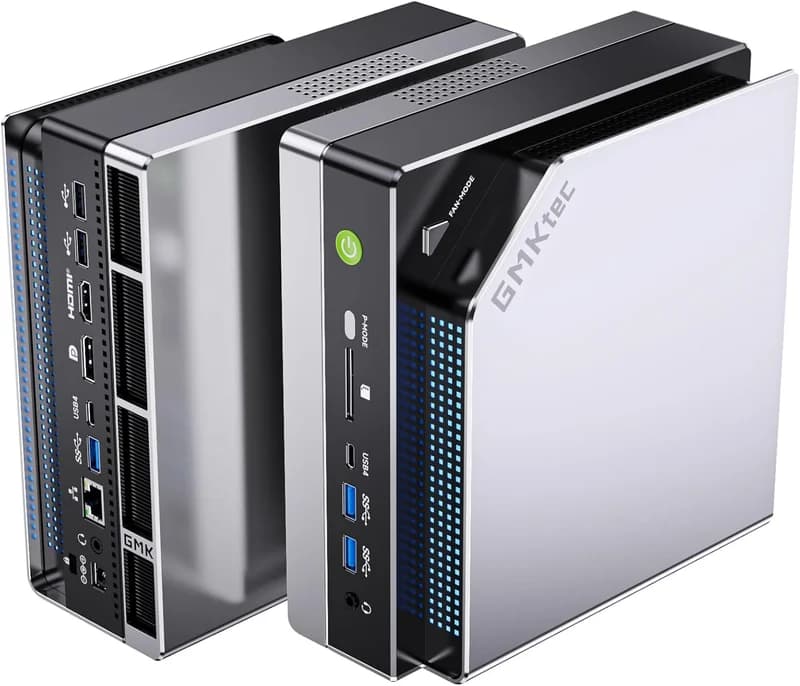
GMKtec EVO-X2 (Ryzen AI Max+ 395, 128GB)
$3,649Quick answer: On a Strix Halo (AMD Ryzen AI Max+ 395) mini PC, token generation (decode) essentially ties an NVIDIA DGX Spark — both sit around 256–273 GB/s of memory bandwidth, so tokens/sec lands in the same ballpark. But prompt processing (prefill) is about 5× slower: roughly 340 tok/s versus ~1,700 tok/s on gpt-oss 120B in cited testing. Prefill is what sets time-to-first-token, so if your prompts are long — RAG over documents, whole-repo code analysis, big agent contexts — that delay, not tokens/sec, is what feels slow. Verdict up front: for short-prompt chat and coding, a ~$1,999 Strix Halo box is still the value pick; for long-context or RAG-heavy work, either add a GPU over OCuLink/PCIe or buy a compute-heavier box like the DGX Spark.
The number every "best mini PC" guide skips
If you've bought a 128GB Strix Halo box and it feels slower than the tokens/sec numbers promised, you're not imagining it — and you didn't buy the wrong box. You just ran into the one metric almost every "best mini PC for local AI" guide leaves out: prefill, also called prompt processing or time-to-first-token (TTFT).
Here's the whole story in one line: on a Ryzen AI Max+ 395, decode (token generation) is competitive with a DGX Spark, but prefill (reading your prompt) is roughly 5× slower. On short prompts you'll never notice. On long ones — the exact workloads people buy a 128GB box for — it's the difference between a snappy assistant and one that makes you wait several seconds before the first word appears, every single turn.
Our companion piece, how fast is Strix Halo, really, covers the decode half of this story in depth — the tokens/sec you get once generation starts. This post is the other half: the prefill half, the part that decides how long you wait for generation to begin. Together they're the complete picture. Alone, decode-only tokens/sec is misleading for anyone doing long-context work.
Decode vs prefill: two phases with opposite appetites
Every time you send a prompt to a local LLM, the box does two very different jobs, and they stress completely different parts of the hardware.
Prefill = reading your prompt. Before the model can answer, it has to process every token of your input — your question, the retrieved documents, the code files, the system prompt — and build up its internal state (the KV cache). This is highly parallel matrix math across the whole prompt at once, so it's compute-bound: it wants raw FLOPs. The more tokens in your prompt, the more compute prefill needs, and the longer it takes.
Decode = writing the answer. Once prefill is done, the model generates the response one token at a time, re-reading the weights it needs for each new token. This is memory-bandwidth-bound: it wants GB/s, not FLOPs. This is the phase the familiar "tokens per second" number describes.
Now overlay Strix Halo's design. The Ryzen AI Max+ 395 pairs 128GB of LPDDR5X-8000 unified memory at ~256 GB/s theoretical (~215 GB/s real) with a Radeon 8060S iGPU (40 CU, RDNA 3.5) — roughly RTX 4070-mobile-class compute. In other words: server-class memory capacity bolted to iGPU-class compute. That combination is great at decode (the capacity holds huge models, the bandwidth keeps generation usable) and weak at prefill (there simply isn't much raw compute to chew through a long prompt fast).
"Prefill is compute-bound and decode is memory-bandwidth-bound. Strix Halo has server-class memory capacity but iGPU-class compute — so it competes on decode and loses on prefill. That single sentence explains the entire DGX-Spark-premium question."
If this compute-vs-bandwidth framing is new, our unified memory vs VRAM explainer unpacks why capacity and bandwidth are separate axes — and prefill adds a third, compute, that the capacity-vs-bandwidth debate usually ignores entirely.
The number the guides skip: ~5× on prefill
Here is the head-to-head that the mainstream buyer's guides never print. On gpt-oss 120B, a wave of June–July 2026 benchmark writeups converged on the same finding:
| Phase | Strix Halo (Ryzen AI Max+ 395) | NVIDIA DGX Spark (GB10) | Gap |
|---|---|---|---|
| Prefill (prompt processing / TTFT) | ~340 tok/s | ~1,723 tok/s | ~5× slower |
| Decode (token generation) | competitive (~256 GB/s theoretical) | competitive (273 GB/s) | near tie |
Source & caveat: the ~1,723 vs ~339.87 tok/s prefill figures come from hardware-corner.net's "First DGX Spark LLM Benchmarks" and are corroborated by owner-experience writeups at yuv.ai and vettedconsumer.com, all on gpt-oss 120B. The decode near-tie tracks the memory bandwidth numbers in our own catalog (Strix Halo 256 GB/s theoretical, DGX Spark 273 GB/s). Treat the prefill numbers as "expect ~5× on this model," not a universal spec — prefill throughput is hardware-, quant-, and prompt-dependent, and other models will differ.
What does a 5× prefill gap actually feel like? Frame it in wall-clock time. Say a long RAG prompt or a full code file is 12,000 tokens. At ~1,700 tok/s the Spark reads it in about 7 seconds; at ~340 tok/s the Strix Halo box takes about 35 seconds — before it writes a single word of the answer. And that cost is paid every turn where the prompt is long. Decode being a tie doesn't rescue this: if you wait 35 seconds to start, an 80-tok/s decode speed is cold comfort.
This is the myth-busting section, so state it plainly: the DGX Spark's price premium doesn't buy you faster token generation — it buys you faster time-to-first-token. We break the box-level decision down further in DGX Spark vs Strix Halo; prefill is the missing variable that comparison's bandwidth math didn't capture.
Who actually feels this (and who doesn't)
Now the honest part, because the internet loves to over-correct this into "Strix Halo is bad." It isn't. Prefill is a workload-specific weakness. Whether it matters to you depends entirely on how long your prompts are.
| You feel the prefill tax if you run… | You don't if you run… |
|---|---|
| RAG over big documents (retrieved text stuffed into the prompt) | Short-prompt chat and Q&A |
| Full-repo or whole-file code analysis | Quick coding completions, small snippets |
| 32K+ token agent loops with long histories | Short agent turns, tight context windows |
| Long system prompts / few-shot templates | Decode-heavy generation (long answers, short inputs) |
The right-hand column is where Strix Halo genuinely shines, and it's a large share of real use. Decode-dominated work — where the prompt is short and the answer is long — plays directly to the box's strengths. For example, Qwen3-Coder runs around ~101 tok/s on the 395 (per the strix-halo-guide GitHub benchmarks), which is faster than you can read. If your day is mostly short prompts and generation, the cheap box wins and you should stop reading here and buy one.
The prefill problem is specifically a long-prompt, time-to-first-token problem. It's not a verdict on the hardware; it's a verdict on a workload. For picking which model matches your box and prompt style, see the best local LLM models for a 128GB mini PC — MoE models with short prompts are the Strix Halo sweet spot; long-context dense workloads are where prefill bites hardest.
Fixing prefill on the box you already own
If you already own a Strix Halo box and long-context work feels slow, don't panic-sell it. Three configuration levers can materially improve prefill before you spend another dollar. Treat these as configuration guidance, not guaranteed speedups — results vary with model, quant, runtime, and prompt.
1. Use an f16 KV cache for long first-turn prompts
This one is counterintuitive and it's the highest-value tweak. Quantizing the KV cache to q4 or q8 saves memory and speeds decode — but per hardware-corner's optimization testing, it slows prompt ingestion. For long first-turn prompts where prefill dominates, keep the KV cache at f16. You trade a little memory headroom (you have 96GB allocatable — you can spare it) for faster time-to-first-token on exactly the workloads that need it.
2. Compile llama.cpp with ROCWMMA + Flash Attention
On ROCm, building llama.cpp with ROCWMMA (AMD's matrix-core WMMA path) and Flash Attention enabled materially improves long-context prefill on the Radeon 8060S. This is the same ROCm/llama.cpp tuning territory covered in our Strix Halo VRAM allocation guide — if you're already in the BIOS and driver stack allocating GTT memory, this is the natural next step. It won't close the 5× gap to a Blackwell GPU, but it makes the box's prefill as resilient as the software allows.
3. Budget for worse-than-published numbers on real text
A trust-builder that almost no guide mentions: hardware-corner found that real document text prefills roughly 24–33% slower than the synthetic repeated-token prompts most benchmarks use. So the ~340 tok/s figure above is optimistic for real RAG. When you plan a long-context workflow, assume real-world prefill runs slower than the published number, not faster. This is precisely why RAG "feels" worse than benchmarks suggest — the benchmarks aren't lying, they're just measuring an easier prompt than the one you're actually feeding it.
The hardware fix: add compute or buy compute
When tuning isn't enough — when your workload is genuinely long-context and prefill is the bottleneck — there's only one real fix, and it's the one thing software can't conjure: more parallel compute. You get it two ways.
Add compute: OCuLink or PCIe eGPU
Bolt a discrete GPU onto the Strix Halo box and let it do the compute-heavy prefill. Two hardware paths exist:
- OCuLink — GMKtec's newer EVO-X3 (shipped July 6, 2026) added an OCuLink port specifically for this: the clean external-GPU escape hatch. (The EVO-X3 isn't in our catalog yet — reference only.)
- PCIe x16 slot — the Minisforum MS-S1 Max is the in-catalog box with a real PCIe x16 slot, so you can seat a discrete card internally. It also brings dual 10GbE and a 320W PSU, which helps if your RAG corpus lives on a NAS.
The honest trade-off: an eGPU reintroduces a VRAM ceiling for whatever runs on the accelerated card. You get fast prefill on the part that fits in the GPU's VRAM, while the big-model capacity still lives in unified memory — a hybrid that adds cost and complexity. It's the right move for a serious long-context workflow, not a casual one.
Buy compute: DGX Spark / ASUS Ascent GX10
The other route is to buy silicon that's compute-heavy from the start. The NVIDIA DGX Spark and its cheaper sibling the ASUS Ascent GX10 both run the GB10 Grace Blackwell superchip, whose 5th-gen Blackwell tensor cores are what deliver the ~5× prefill advantage. You keep 128GB of unified memory and CUDA-native tooling; you pay $6,950 (Spark) or $5,999–$7,999 (GX10) for it. Decode is still a tie — you're buying prefill and CUDA, nothing more.
One more option people reach for: Apple. The Mac Studio M4 Max has far higher memory bandwidth (410–546 GB/s) than any Strix Halo or GB10 box, which helps decode — but it is also not a prefill monster. Higher bandwidth speeds token generation, not prompt processing; Apple's own boxes are known for slow prefill on long contexts too. So don't buy a Mac Studio expecting it to fix time-to-first-token; buy it for decode bandwidth. (Note: Apple's 256GB/512GB configs were pulled during the 2026 DRAM shortage — the M4 Max tops out at 128GB and the M3 Ultra ships 96GB-only right now.)
For the full box-by-box, tier-by-tier breakdown, our best mini PC for local LLMs guide maps every option to a budget and workload.
Bottom line: buy on time-to-first-token, not headline tok/s
The metric that should decide your purchase is time-to-first-token for your prompt length — not the headline tokens/sec number every guide leads with. Segment it by how you actually work:
- Short prompts, decode-heavy (chat, quick coding, long-answer generation): the ~$1,999 Strix Halo box (GMKtec EVO-X2, Framework Desktop) is still the value king. Prefill never bites you.
- Long-context, prefill-heavy (RAG, whole-repo code, big agent loops): either add a GPU over OCuLink/PCIe (Minisforum MS-S1 Max for the PCIe path) or buy the compute-heavy box (DGX Spark / ASUS Ascent GX10).
- Already own a Strix Halo box and it feels slow? Try f16 KV cache and a ROCWMMA + Flash Attention build first — you may recover enough prefill headroom to keep the box you have.
Decode ties. Prefill is ~5× slower. That one fact — decode ties, prefill is roughly 340 vs 1,700 tok/s on gpt-oss 120B — is the whole story, and it resolves cleanly into a purchase from every direction. Buy the box that matches your prompt length, and you'll never feel "slow" again.