How Much Context Can a 128GB Mini PC Actually Hold? The KV Cache Math Nobody Runs Before Buying
Everyone sizes a unified-memory box against model weights. Almost nobody sizes it against the KV cache — and on a 128K-token agent run, the cache is the number that decides whether the job finishes. Here's the math, box by box, plus the KV-quantization trade that makes long first prompts slower, not faster.
DataHardware Team
Our Top Pick
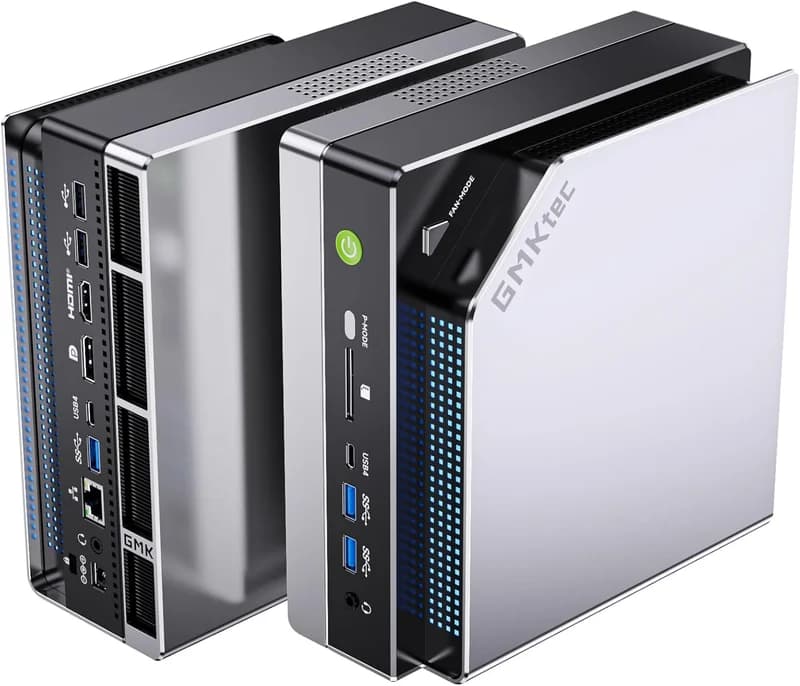
GMKtec EVO-X2 (Ryzen AI Max+ 395, 128GB)
$3,649Quick answer: A 128GB unified-memory mini PC holds a full 128K-token context on a 70B-class model only with a quantized KV cache: at fp16 the KV cache alone consumes roughly 40 GB on top of ~40 GB of 4-bit weights, leaving no headroom. Mixture-of-experts models invert this — a 120B MoE reads only ~3–4 GB per token, so the same 128GB box runs a larger model and a longer context than a dense 70B can. The 40 GB KV figure is SitePoint's, not ours. And on a Strix Halo box the binding constraint at long context is not capacity at all — it is prefill: third-party GPT-OSS 120B benchmarks put it near 340 tok/s against roughly 1,700 tok/s on a DGX Spark, while decode is a near-tie (~34 vs ~38 tok/s).

The three things competing for your 128GB (and only one gets discussed)
Open any "how much memory do I need for local AI" article and you get one number: the size of the model file. That number is the easy part. Three things compete for the memory on a unified-memory box, and they fail in different ways:
- Model weights. Fixed, known before you download, and trivially predictable — a 70B at 4-bit is about 40GB and stays about 40GB forever.
- The KV cache. Grows with every token in your context window and with every concurrent request. Invisible until it kills the run.
- Runtime and OS overhead. The part you carve out so the machine still works. On a Strix Halo box this is also what caps your GPU-allocatable ceiling below the sticker capacity.
DataHardware has already sized #1 and #3 in detail. How much unified memory you actually need maps model sizes to box tiers, and the Strix Halo VRAM allocation guide shows how to free the allocatable ceiling every table below assumes (96GB on Windows, roughly 110–120GB via Linux GTT). This post is the missing third leg: #2, the KV cache — the consumer that decides whether your 128K-token agent run survives.
Here is the practical shape of the problem. A dense 70B at 4-bit loads on a 128GB box with ~56GB apparently to spare. Feels roomy. Then you point a coding agent at a repository, the window fills toward 128K tokens, and the box dies — not because the model grew, but because the cache did.
The GMKtec EVO-X2 is the box most readers are sizing this against: $3,649 for 128GB of LPDDR5X-8000 with up to 96GB GPU-allocatable, per its listed specs. That 96GB — not the 128GB on the box — is the real budget everything below is drawn from.
How the KV cache actually scales (the formula, then the table)
You do not need the tensor algebra to buy correctly. You need the shape of the function, and it is refreshingly simple:
KV cache size ∝ context length × batch size × layers × KV heads × head dimension × bytes per element.
Everything after "batch size" is fixed by the model you chose. The two terms you control at runtime are context length and batch size, and the relationship to both is linear. Double your context, double your cache. Serve four users at once instead of one, quadruple it. SitePoint's KV cache survival guide makes the consequence explicit: four concurrent 128K streams on a 70B come to roughly 160GB of cache — more than the weights, and beyond any single box in this category.
That linearity is the whole reason this catches people out. Weights are a step function you check once. The cache is a ramp you walk up during a session without noticing.
Here are the externally sourced figures worth planning against. Every row below is attributed; we have not measured these and we have not filled gaps with estimates.
| Model | Context | KV cache | Source |
|---|---|---|---|
| 7B, Q4_K_M | 4K | ~6 GB total footprint | SitePoint, "The KV Cache Survival Guide" |
| 7B, Q4_K_M | 128K | ~14 GB total footprint | SitePoint, "The KV Cache Survival Guide" |
| 30B-class | 128K | 8–12 GB beyond weights | SitePoint, "The KV Cache Survival Guide" |
| Llama 3.1 70B, fp16 KV | 128K | ~40 GB (single stream) | SitePoint, "The KV Cache Survival Guide" |
| Llama 3.1 405B, fp16 KV | 128K | ~66 GB | Mahernaija, "LLM: How to Calculate KV Cache" |
| 70B, fp16 KV, 4 concurrent streams | 128K each | ~160 GB | SitePoint (linear in context × batch) |
Read the 7B rows carefully, because they are the most useful sanity check in the table: going from 4K to 128K context on a small model roughly doubles its total memory footprint. The model did not change. Only the window did.
The 70B-class dense row is the one that decides purchases. Forty gigabytes of weights plus forty gigabytes of fp16 cache is 80GB against a 96GB allocatable ceiling. It fits. There is no room for a second stream, a comfortable safety margin, or a larger quantization of the weights. The 405B row is here only to show where the curve goes — that model exceeds any box in this category regardless of cache.
If you want to run your own combination rather than read ours, our VRAM calculator does the weights half of the arithmetic; add the cache figure from the table above for the model class you are targeting.

Context ceilings box by box (the buyer's table)
This is where the abstraction becomes a purchase. Capacity and bandwidth below come from our catalog; the context headroom column is a derived estimate — it is total allocatable memory minus a realistic weights budget for that tier, read against the sourced cache figures above. Treat the bands as planning guidance, not guarantees, because runtime overhead varies.
| Box | Unified memory | Bandwidth | Realistic model tier | Context headroom (estimate) |
|---|---|---|---|---|
| GMKtec M8 | 16GB LPDDR5 | — | Small models only | Short windows; 128K is out of reach |
| Mac Mini M4 (base) | 16–24GB | 120 GB/s | 7–14B class | Context-starved by design — a 7B at 128K is already ~14GB (SitePoint) |
| GMKtec M6 Ultra | 32GB DDR5 | — | 13B-class Q4 | Comfortable to ~32K; 128K is where the cache bites first |
| Beelink SER8 | 32GB DDR5-5600 | — | 13B-class Q4 | Same 32GB wall as above |
| Mac Mini M4 Pro | 24–64GB | 273 GB/s | 30B-class | Good 32K machine; 128K on a 30B needs the cited 8–12GB beyond weights |
| Mac Studio M3 Ultra | 96GB (256/512GB configs discontinued) | 819 GB/s | 70B-class Q4 | Highest bandwidth in the category, but the shortage-era 96GB config caps the cache budget |
| Framework Desktop | 128GB (up to 96GB allocatable) | 256 GB/s theoretical (~215 GB/s real) | 70B Q4 or 120B MoE | 128K on a 70B fits fp16 with no margin; quantized KV is the comfortable path |
| GMKtec EVO-X2 | 128GB (up to 96GB allocatable) | 256 GB/s theoretical (~215 GB/s real) | 70B Q4 or 120B MoE | Same as above — capacity is fine, prefill is the real limit |
| Beelink GTR9 Pro | 128GB LPDDR5X-8000 | ~256–273 GB/s | 70B Q4 or 120B MoE | Same band; dual 10GbE if the long-context corpus lives on a NAS |
| HP Z2 Mini G1a | 128GB LPDDR5X-8533 ECC (up to 96GB allocatable) | ~256 GB/s | 70B Q4 or 120B MoE | Same band with a workstation warranty |
| Minisforum MS-S1 Max | 128GB (up to 96GB allocatable) | 256 GB/s theoretical (~215 GB/s real) | 70B Q4 or 120B MoE | Same band — $3,879 direct from Minisforum (2026-10-11) |
| NVIDIA DGX Spark | 128GB LPDDR5X coherent | 273 GB/s | 70B Q4 or 120B MoE | Same capacity band, materially faster prefill — see below |
| ASUS Ascent GX10 | 128GB LPDDR5X | 273 GB/s | 70B Q4 or 120B MoE | Identical GB10 band to the Spark |
| Mac Studio M4 Max | Up to 128GB | 410–546 GB/s | 70B Q4 or 120B MoE | Best bandwidth-per-dollar for a large cache at 128GB |
Three readings fall out of that table immediately.
The 32GB tier is where the cache bites first. A 13B at 4-bit leaves real room at 4K and almost none at 128K. That is not a defect — the GMKtec M6 Ultra at $629 is an excellent always-on agent host for short-turn work. It is simply not a long-context machine, and no configuration makes it one.
The 64GB tier is a 32K machine, not a 128K machine. The Mac Mini M4 Pro at $1,599 (final price, discontinued) with 273 GB/s was genuinely strong for 30B-class work at moderate windows. Push it to 128K on a dense 70B and the arithmetic simply does not close.
The 128GB tier is the first one where 128K context is a real option — and that, more than the weights, is the argument for stepping up. If your demand goes past a single 128K stream (multiple concurrent agents, larger dense models), the step is to 192GB, which we cover in 192GB vs 128GB unified memory.
Cost-sensitive buyers should note the Framework Desktop at $3,449 is the cheapest credible 128GB entry, with the same 96GB allocatable ceiling as the rest of the field. If you are weighing it head-to-head, see EVO-X2 vs Framework Desktop. The wider Strix Halo hub lists the whole field.

Why MoE models are the long-context cheat code
Everything above assumes a dense model, where every parameter participates in every token. A mixture-of-experts model routes each token through a small subset of its parameters instead, which changes the economics twice over.
GPT-OSS 120B carries 117B total parameters (per OpenAI's model card) but activates only a fraction per token — on the order of 3–4 GB read per token rather than the full weight set. That has two consequences that both help long context:
- Bandwidth stops being the bottleneck it is for a dense 70B. Decode speed on these boxes is roughly memory-bandwidth-bound, and reading 3–4 GB per token instead of 40 GB is why MoE feels fast on hardware that struggles with dense models of similar total size.
- You get a bigger model without spending the whole memory budget on a cache-hostile architecture. The community throughput figures we already track are consistent: Qwen3-30B-A3B-class models at 72–75 tok/s and the far-heavier-per-token Qwen3-235B-A22B down at ~8–11 tok/s — the second showing that MoE only helps when the active parameter count is small. Both come from community benchmark threads collected on the Strix Halo Wiki llama.cpp performance tables, not from DataHardware testing.
The practical takeaway for a long-context buyer: if your workload is a coding agent or a RAG pipeline holding a large window, a 120B MoE is usually a better use of 128GB than a dense 70B. You get a more capable model and more room for cache at the same time. Our walkthrough of running GPT-OSS 120B locally on a mini PC covers the setup end to end. If 128GB is out of budget, GPT-OSS 20B applies the same trick at a tier the 32–64GB boxes can hold.

KV cache quantization: the trade nobody tells you about
Once you know the cache is the problem, the obvious fix is to shrink it — quantize the KV cache to q8_0 or q4_0 and reclaim gigabytes. It works. It also has a cost that almost no ranking article states plainly.
Quantizing the KV cache speeds decode after the context is filled, but slows prompt ingestion. This is documented in the Level1Techs "Strix Halo LLM inference notes" thread and echoed across scattered GitHub notes: the same q4_0/q8_0 setting that makes a long continued generation faster makes the wait before your first token on a long prompt worse than plain f16. The intuition is that the cache has to be written in a compressed format during the ingest pass, and ingest is exactly where these boxes are weakest already.
So the decision inverts depending on your workload shape, not your memory:
| Your workload | KV setting | Why |
|---|---|---|
| Long first-turn prompt (whole repo, big document, RAG stuff-the-window) | f16 | Prefill dominates wall time; quantized KV makes it worse |
| Long continued generation in one session after the context is loaded | q8_0 | Decode benefits once ingest is already paid for |
| The cache genuinely does not fit (128K on a dense 70B, or multiple streams) | q4_0 / q8_0 | A slower ingest beats an out-of-memory error |
| Short prompts, short windows | f16 | You have the headroom; do not trade speed for memory you are not short of |
The same Level1Techs notes report 128K f16 runs completing without truncation on these boxes — a third-party observation, not a DataHardware measurement, but enough to establish that the ceiling is real and reachable rather than theoretical.
If you have 96GB allocatable and a single-user workload, start at f16 and only quantize when you hit a wall. That is the opposite of the advice you will find in discrete-GPU articles, and it is correct here precisely because you have capacity those articles assume you do not.

The real wall on Strix Halo isn't memory — it's prefill
Here is the reframe the whole post has been building toward. On a 128GB Strix Halo box, long context is affordable. What it is not is fast to start.
Prompt processing — prefill — is the pass that turns your input tokens into the cache before generation begins. Third-party GPT-OSS 120B benchmarks put that pass at roughly 340 tok/s on Strix Halo against roughly 1,700 tok/s on a DGX Spark: about a 5× gap. Meanwhile decode is effectively a tie — around 34 tok/s versus 38 tok/s (Micheal Lanham, Medium, 2026) — which makes sense, because both platforms sit in the same 256–273 GB/s bandwidth band. Capacity is equal, decode is equal, prefill is not.
Multiply that by context length and the consequence is obvious: prefill cost scales with how many tokens you are ingesting, so the longer your window, the more the 5× gap costs you in wall-clock seconds before the first token appears. A 128K-token repo dump is precisely the workload that converts a benchmark footnote into a daily annoyance.
That is the case for the NVIDIA DGX Spark at $6,950: 128GB of coherent unified memory at 273 GB/s with CUDA-native tooling. You are not buying capacity (the Strix Halo boxes match it) and you are not buying decode (it is a tie). You are buying prefill and the software stack. Worth knowing before you spend: on the Strix Halo side, the configuration levers in our prefill deep dive — f16 KV for long first prompts, a ROCWMMA + Flash Attention llama.cpp build — recover part of the gap for free. Try tuning the box you own before you buy a new one.
Our deeper treatments: Strix Halo prefill and time-to-first-token for the latency mechanics, Strix Halo memory bandwidth for why 256 GB/s is the ceiling, and DGX Spark vs Strix Halo for the platform matchup. Side by side on price: DGX Spark vs GMKtec EVO-X2. The GB10 hub covers the CUDA-native field.

So which box for your context length?
Three clean recommendations, each keyed to a context target rather than a budget.
32K context, mostly short turns → the 64GB tier is enough
If your windows stay near 32K and your model is 30B-class, you do not need 128GB and you should not pay for it. The Mac Mini M4 Pro ($1,599 final, discontinued, 24–64GB, 273 GB/s) is silent, small, and has the bandwidth to make a 30B pleasant. The cited 8–12GB of cache beyond weights at 128K on a 30B is the number to check yourself against before deciding you have outgrown it. See M4 Pro vs M4 Max for the step-up math and the Apple Silicon hub for the rest of the line.
128K coding agent, cost-sensitive → 128GB Strix Halo
This is the default answer and it is a good one. The GMKtec EVO-X2 ($3,649) or the Framework Desktop ($3,449) both give you 128GB with up to 96GB allocatable — enough for a 120B MoE with a large cache, or a dense 70B at 128K with quantized KV. You will wait longer on first token than a Spark owner. If your agent runs long after it starts, that trade is fine. Our best mini PC for a local coding agent guide goes deeper on that specific workload. The Beelink GTR9 Pro ($4,349) is the same tier with dual 10GbE if your corpus lives on a NAS, and the HP Z2 Mini G1a ($5,349 – $7,406) is the warranty-backed version. The Minisforum MS-S1 Max belongs in this group too, at $3,879 direct from Minisforum (2026-10-11).
128K context where time-to-first-token matters → CUDA prefill or Apple bandwidth
Two routes. For prefill: the DGX Spark ($6,950) or the ASUS Ascent GX10 ($5,999 – $7,999), same GB10 silicon, same 273 GB/s, same CUDA advantage on the ingest pass.
For bandwidth: the Mac Studio M4 Max ($2,499+ final, now discontinued) at up to 128GB and 410–546 GB/s held the highest real bandwidth at 128GB capacity, which is what makes a big cache pleasant to decode against. Be clear about what it does not fix: bandwidth speeds decode, not prefill. The Mac Studio M3 Ultra went further still on bandwidth (819 GB/s, $5,299 final) but ended its life in a 96GB configuration, which caps exactly the budget this post is about — see M4 Max vs M3 Ultra. Not sure which tier fits your workload? The hardware advisor narrows it by use case.

Bottom line
A 128GB unified-memory mini PC holds a full 128K-token context on a 70B-class model only with a quantized KV cache: at fp16 the KV cache alone consumes roughly 40 GB on top of ~40 GB of 4-bit weights, leaving no headroom. Mixture-of-experts models invert this — a 120B MoE reads only ~3–4 GB per token, so the same 128GB box runs a larger model and a longer context than a dense 70B can.
One line per tier:
- 16–32GB — small models, short windows. Long context is not on the menu at any setting.
- 64GB — a very good 32K machine on a 30B-class model. Do not plan a 128K dense workload here.
- 96GB (M3 Ultra, shortage config) — unmatched bandwidth, but the capacity cap limits the cache budget.
- 128GB Strix Halo — 128K is real and affordable; prefill is what you actually pay for it.
- 128GB GB10 (Spark / GX10) — same capacity, ~5× faster prefill per third-party benchmarks, CUDA tooling.
- 128GB M4 Max — the bandwidth answer at 410–546 GB/s. Fast decode over a big cache; still not a prefill fix.
Size your box against the context window you actually intend to use, not the model file you intend to download. Run your weights through the VRAM calculator, add the cache figure for your model class from the table above, and compare the total against the allocatable ceiling — not the number on the box.